



Abstract: Risk-based authentication (RBA) is an adaptive security measure to strengthen password-based authentication against account takeover attacks. Our study on 65 participants shows that users find RBA more usable than two-factor authentication equivalents and more secure than password-only authentication. We identify pitfalls and provide guidelines for putting RBA into practice.
This is an extended and revised version of a conference paper that was presented at ACSAC 2020 [1]
“CHOOSE A STRONG PASSWORD” is a popular advice by many IT security practitioners to keep your online accounts secure on the Internet. However, even a strong password does not necessarily protect against account takeover. This may be the case when login credentials (email and password) for online services were stolen, e.g., by a data breach, and shared in the hacker community. The website haveibeenpwned.com stated more than 11.2 billion leaked login credentials in April 2021. When obtained, attackers can automatically enter these credentials on other websites. As users tend to reuse passwords across websites, these so-called credential stuffing or—a modified version—password spraying attacks can be very successful. In 2020, worldwide cloud service provider Akamai registered a peak of more than 350 million credential stuffing attacks per day, showing that these attacks are very popular. Taking it a step further, machine learning based algorithms can even use the stolen credentials to guess passwords more efficiently. So what can service providers do to protect their users against these attacks?
A common piece of advice is to use two-factor authentication (2FA). In this case, users need to provide their password and a second authentication factor during login. For instance, they need to enter a code that was sent to a second device. Although many services offer 2FA, its user acceptance tends to be very low. Google offers 2FA since 2011, but still had less than 10% of users actively using it in 2018. However, keeping more than 90% of these non-2FA users unprotected against password attacks is certainly not an option for responsible service providers. Therefore, it is not surprising that major online services use additional measures to protect these users. Risk-based authentication (RBA) [2] [3] is
one of them, which has the potential to increase password authentication security without sacrificing usability.
Risk-based Authentication (RBA)
Online services using RBA monitor contextual features when the user enters the login credentials (see Figure 1). The theoretical range of possible features can be very large. These range from network (e.g., IP address and IPbased geolocation) or device (e.g., browser name and version), to behavior based ones (e.g., login time) [4]. However, only few features showed to be useful in practice [4]. After the user submitted the login form, RBA estimates a risk score based on the login history of the user. The scores are typically classified into low, medium, and high risk. The risk classifies how likely the login behavior is unusual to previous login attempts, i.e., that it is an account takeover attempt.
Depending on the classified risk, the online service performs different actions (see Figure 1). On a low risk (e.g., same device, location, and login time as in previous logins) the service grants access without further intervention. If the risk is considered medium (e.g., unusual device, location, and time) the service typically requests an additional authentication factor to verify the claimed identity. As email addresses are often required to register user accounts, many online services request verification of the user’s email address in this case [3]. On a high risk (e.g., unrealistic device, location, and time), the service can block access. However, this involves the risk of locking out legitimate users classified as a high risk. For this reason, blocking users is a rare event in practice. Our previous observations on popular websites support this view [3].
RBA is recommended by NIST and NCSC to protect users from attacks like credential stuffing and password spraying. Its usage tended to be limited to few major online services, like Amazon, Facebook, Google, and LinkedIn, in 2018 [3]. No recent usage data is known in the literature, but commercial sales of RBA solutions are currently increasing and are expected to do so in the future. We also expect that more research on RBA can foster a wide-spread RBA deployment in the wild. This includes open source and proprietary applications for small and medium-
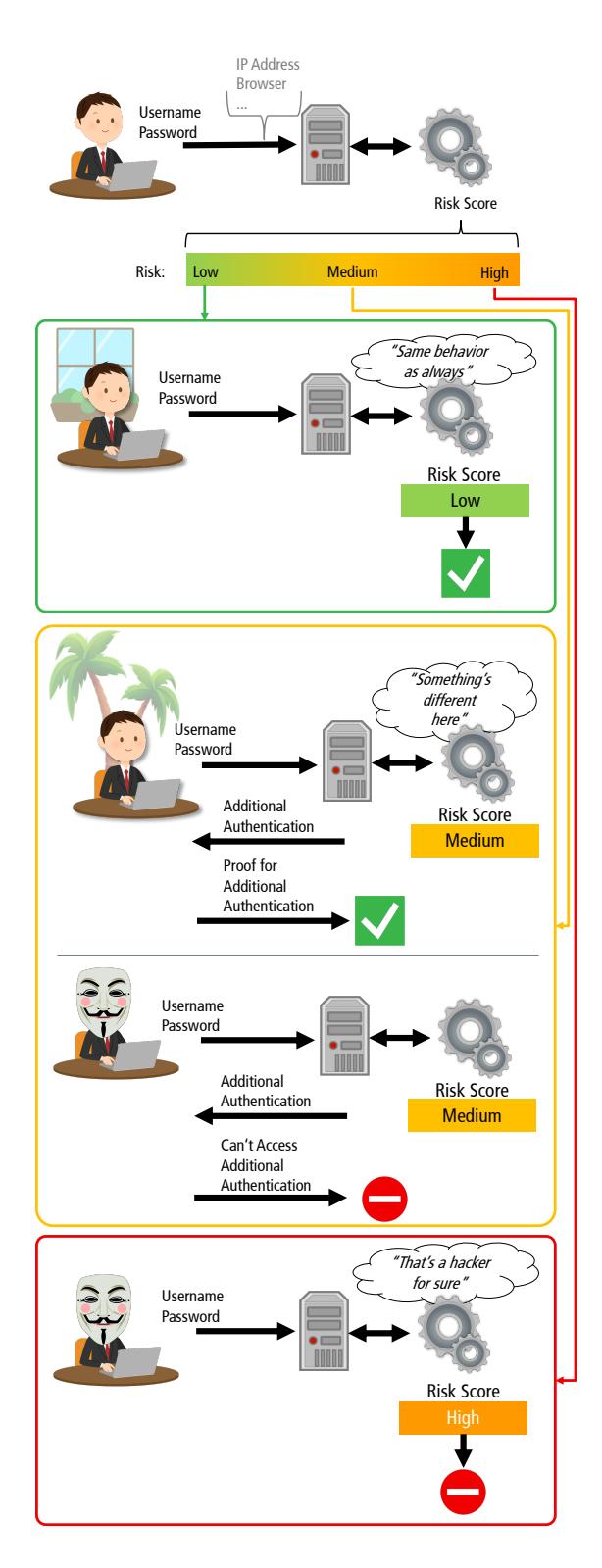
Figure 1. Overview of a RBA system
sized websites, that do not have the budget to develop RBA solutions on their own.
We Studied RBA’s User Perceptions
Our work focused on the following research questions. These questions can help to provide answers on how users perceive RBA compared to password-only authentication and equivalent 2FA variants, and if RBA has potential to compensate low 2FA adoption rates.
Usability perceptions:
- U1: How does using RBA affect the user acceptance compared to 2FA, and how does the frequency of asking for re-authentication influence it?
- U2: How does RBA usage affect the usability compared to 2FA and password-only authentication?
- U3: In which context do users accept RBA?
- U4: Do users understand why they sometimes have to re-authenticate with RBA?
Security perceptions:
- S1: How does the security perception of RBA compare to those of 2FA and password-only authentication?
- S2: How does the perceived level of protection of RBA compare those of 2FA and passwordonly authentication?
- S3: In which contexts do users feel protected with RBA?
We answered these questions with a lab study involving 65 participants. Our results show that users perceived RBA significantly more secure than password-only authentication. RBA was also found more usable than the studied 2FA variant in many use cases. The results underline that the way RBA is implemented affects the user acceptance. We also discovered pitfalls that need to be addressed in RBA implementations to prevent a negative user experience. Our contributions support developers and service owners to decide which authentication method fits best to their use case scenario (e.g., online banking or social media website).
STUDY
We developed a website for the lab study to compare the different authentication methods. The website’s functionalities were similar to those offered by cloud storage services such as Dropbox, Google Drive, or Nextcloud. After registration, the study participant obtained personal storage on the website. The participant could upload, download, share, and delete files. Also, the participant had the possibility to take pictures via webcam. These functionalities enabled us to test a website on which participants share and experience sensitive data.
The participants had to log in to access the website. After submitting the login credentials, each participant perceived one of these four authentication methods (depending on the assigned study condition):
- (i) 2FA: The participant had to provide an additional authentication factor after each successful password entry. More specifically, the participant had to enter a security code that was sent to the participant’s email address.
- (ii) RBA-DEVICE (RBA-DEV): The participant had to re-authenticate via email, as in the 2FA condition. However, this only happened in cases where the device used for login had never been used before.
- (iii) RBA-LOCATION (RBA-LOC): The participant had to re-authenticate via email, as in the 2FA condition. However, this only happened in cases where the device’s location had never been seen before.
- (iv) PASSWORD-ONLY (PW-ONLY): The participant never had to provide an additional authentication factor.
We chose these four methods and the reauthentication via email based on our observations on the state of practice regarding RBA and other popular authentication methods [3].
To test a generic variant of RBA that reflects the current state of practice, we considered implementations of popular online services. As a result, we based the dialog (see Figure 2b) and the verification email for RBA-LOC and RBA-DEV on the RBA dialog designs of Amazon, Facebook, GOG.com, Google, LinkedIn, and Microsoft. The 2FA dialog (see Figure 2a) and email is similar to the LinkedIn version. We minimized the differences between both dialogs to mitigate that (completely) different dialog texts could bias the
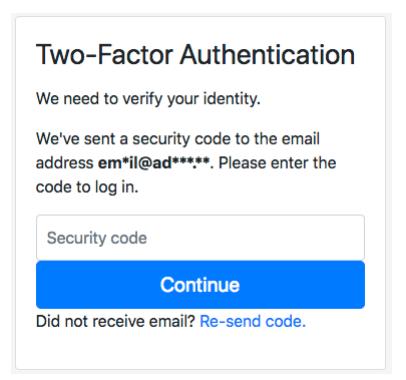
(a) 2FA condition
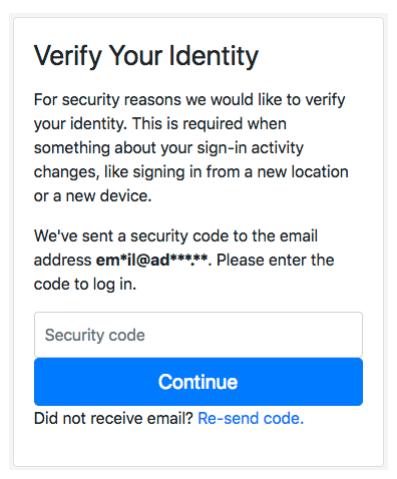
(b) RBA-{LOC,DEV} condition
Figure 2. Re-authentication dialogs presented to the study participants for the different login procedures
participant’s rating in the study conditions.
Study Design
As the studied authentication methods differ in the login procedure, we required our participants to log in several times. They were asked to solve seven tasks on the study website. In these tasks, the participants logged in and out on the website in two different locations using three different devices (2x desktop, 1x mobile device). As a consequence, the participants experienced the corresponding authentication method of the study condition. This means that the participants were asked for re-authentication once (RBA-LOC), twice (RBA-DEV), seven times (2FA), or not at all (PW-ONLY).
We designed the tasks to create an atmosphere where sensitive data is stored and shared on the user account. This data involved confidential company documents and taking a personal picture. Note that pictures are considered more sensitive in Europe compared to other continents [5]. We assumed that with increased sensitive and personal data, including using a personal email account and laptop, this would increase the participant’s immersion into the study scenario.
We introduced two room changes during the study to simulate a change of physical location. To strengthen the impression of a location change, both rooms had a very different appearance. Room A looked like a typical office room, with white wall and grey furniture colors. Room B, our usability lab, looked similar to a living room or hotel room and had warm wall and furniture colors to create a pleasant atmosphere.
Study Setup
The lab study consisted of the four conditions 2FA, RBA-DEV, RBA-LOC, and PW-ONLY. We randomly assigned all participants to one of the four conditions. The study consisted of three stages (task solving, exit survey, and semi-structured interview). The study conductor stayed outside in an observation room next to the study rooms. The conductor could observe the participants’ facial reactions as well as display contents of the devices inside room B via a streamed video recording.
Participants were asked to bring their private laptop and, if required for accessing personal email, their smartphones to the study. We informed the participants that they were required to use their personal email address for registration on the study website. To avoid bias, we did not mention that this email address was possibly also used for authentication purposes.
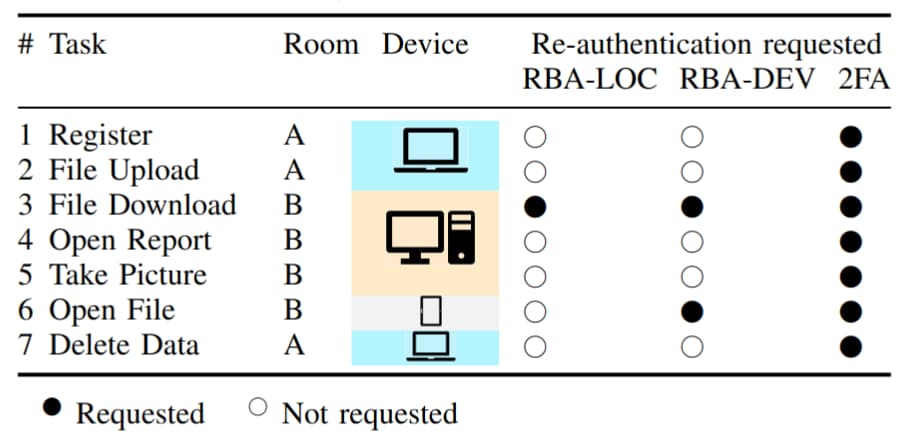
The tasks were designed to represent typical situations in working life (logging in at different locations and devices, and sharing personal data on a website). Table 1 gives an overview of the tasks and when re-authentication was requested in which condition. The participants solved two tasks using their private laptop in room A. After moving to room B, they solved three tasks using a desktop PC and one task using a tablet PC provided in the room. After moving to room A again, they solved the final task on their private laptop again.
After solving the tasks, participants answered a survey on a tablet PC. The survey covered five-point Likert scale questions on usability and security perceptions of the login procedure. We integrated several measures into the survey to mitigate known biases and to check the quality of our results.
After the survey, we conducted a semistructured interview with the participants to gain qualitative feedback on both impressions and personal experiences regarding the tested authentication method.
Table 1. Overview of the study tasks and when reauthentication was requested for RBA-LOC, RBA-DEV and 2FA conditions. No re-authentication was requested for the PW-ONLY condition. Room A and the laptop are known to the RBA system as a common context.
Ethical Considerations
During the re-authentication process, participants had to log into their personal email account to open the email containing the verification code. However, there was a risk that contents of other emails were recorded on video when deciding to open this email on the devices in room B. To solve this issue, we developed an automatic process to hide personal data from the video recording and stream. We piloted and improved the automatic process over a three week period to make it as accurate as possible. We briefed the participants explicitly about this automatic procedure before the study to make them feel comfortable. We also offered the participants to view and inspect the recorded video after the study and to request deletion of the video. One participant made use of that possibility, which underlines that this is an important ethical consideration.
We also offered our participants additional privacy and pseudonymity, including among others: (i) Immediately deleting the salted and hashed login credentials after the study, (ii) en-
forcing non-linkability of personal identifiable information, and (iii) storing data on encrypted hard drives with limited access to study conductors only.
The participants were informed by all these procedures and signed a consent form. The participants were able to withdraw the study anytime. Also, all survey questions offered a “don’t know” option.
We did not have a formal institutional review board (IRB) process at TH Köln, where we conducted this study. But besides our ethical considerations above, we made sure to minimize potential harm by complying with the ethics code of the German Sociological Association (DGS) as well as the standards of good scientific practice of the German Research Foundation (DFG). We also made sure to comply with the terms of the EU General Data Protection Regulation (GDPR).
Recruiting
Our study required participants that use online services with private data. They did not need to have any knowledge in 2FA or RBA. We recruited participants via emails sent to mailing lists of several faculties at University of Cologne and TH Köln. We also advertised on a local radio station targeting a young audience to recruit for the study. We did this to investigate a broad sample of digital natives.
We excluded any participants that attended information security lectures to mitigate bias. The recruiting email stated that the study is about testing a website and that the study lasts about one hour (i.e., 3 · 20 minutes). Among all participants we drew six gift cards worth 25€ each. We also offered candy bars and drinks for the participants’ personal well-being during the study.
RESULTS
The study took place between December 2018 and February 2020 and was completed with 65 participants. 17 participants were female, 47 were male, and one chose not to state the gender. RBA-DEV had five female participants, all remaining conditions had four female participants.
To identify general trends in the survey responses, we tested them for statistical significance. We used Kruskal-Wallis (K-W) tests to evaluate whether there was a significant differ-
ence between all four conditions. In case of a difference, we used Dunn’s multiple comparison test with Bonferroni correction (Dunn-Bonferroni) to identify the conditions that were different. We set 0.05 as our threshold for statistical significance.
For the semi-structured interview, we patterncoded the responses: The answers were read and observed patterns were added to the codebook. Two researchers then coded the answers into the patterns independently. If both coded an answer differently, a third researcher did the final decision. To assess the reliability of the two independently coded responses, we calculated Cohen’s Kappa between them. The resulting κ = 0.82 shows that the results were within the acceptable range of coding agreement [6].
Below, we present the study results, followed by a discussion, ordered by our research questions.
Usability Perceptions
We first compare the usability of the studied authentication schemes. Besides the general user acceptance, we identify contexts in which users prefer RBA to 2FA.
User Acceptance and Usability (U1, U2) In the exit survey, the participants responded to several questions regarding the acceptance of the corresponding login method (see Figure 3). There were no significant differences between PW-ONLY and the other three conditions. However, the participants found RBA significantly less annoying and less tiring than 2FA in most conditions. RBA-LOC group members, who had to do less re-authentication than those of RBA-DEV and 2FA, would use their login procedure significantly even more than those of RBA-DEV and 2FA.
To assess the usability, the participants also answered System Usability Scale (SUS) surveys. The SUS questionnaire is often used in Human Computer Interaction (HCI) to evaluate a system in terms of its usability. The questionnaire consisted of ten Likert scale questions covering different aspects of a system’s usability. We used two adjusted SUS surveys to evaluate the usability of the authentication method and the study website, respectively. Based on the answers, we calculated the SUS score. The score is a number between 0 and 100. The higher the score an authentication method received, the higher we can assume its usability.
With a median SUS score above 80, the PW-ONLY and RBA authentication methods can be considered grade A usability [7] (see Figure 3). With a median SUS score of 76.25, 2FA can be considered grade B usability. The SUS scores of PW-ONLY and RBA-DEV are significantly higher than those of 2FA. PW-ONLY, RBA-LOC, and RBA-DEV also received significantly more positive ratings than 2FA in some of the SUS questions.
Overall, authentication with requested reauthentication took significantly more time than without it. The participants switched their devices in tasks three and six (see Table 1 in Section Study Setup). Taking a closer look at the authentication times in the 2FA condition, where reauthentication was always requested, these were significantly longer in both tasks in most cases (p<0.05, see Figure 3). A reason for these variations could be that some participants logged into their email account once on the desktop PC (task 3) and the tablet PC (task 6).
Concluding the results, the user acceptance of RBA is in some cases significantly higher than 2FA. For the remaining cases, the user acceptance of RBA is not significantly lower than 2FA. In addition, RBA-DEV is perceived significantly more usable than 2FA regarding the SUS score. RBA-LOC and RBA-DEV are perceived significantly more usable than 2FA regarding the answers of the SUS questions. As the main difference of the studied schemes is the amount and frequency of requested re-authentication, we conclude that less requests for re-authentication are accepted significantly higher than more of them. Since PW-ONLY also received a significantly more positive rating than 2FA, RBA is comparable to passwordonly authentication regarding the SUS score and parts of the SUS answers.
Discussion:
RBA participants were asked less often for reauthentication than those of 2FA. We conclude that this was the main reason why RBA and PW-ONLY outweighed 2FA in terms of usability and user acceptance, as 2FA participants mentioned this as well:
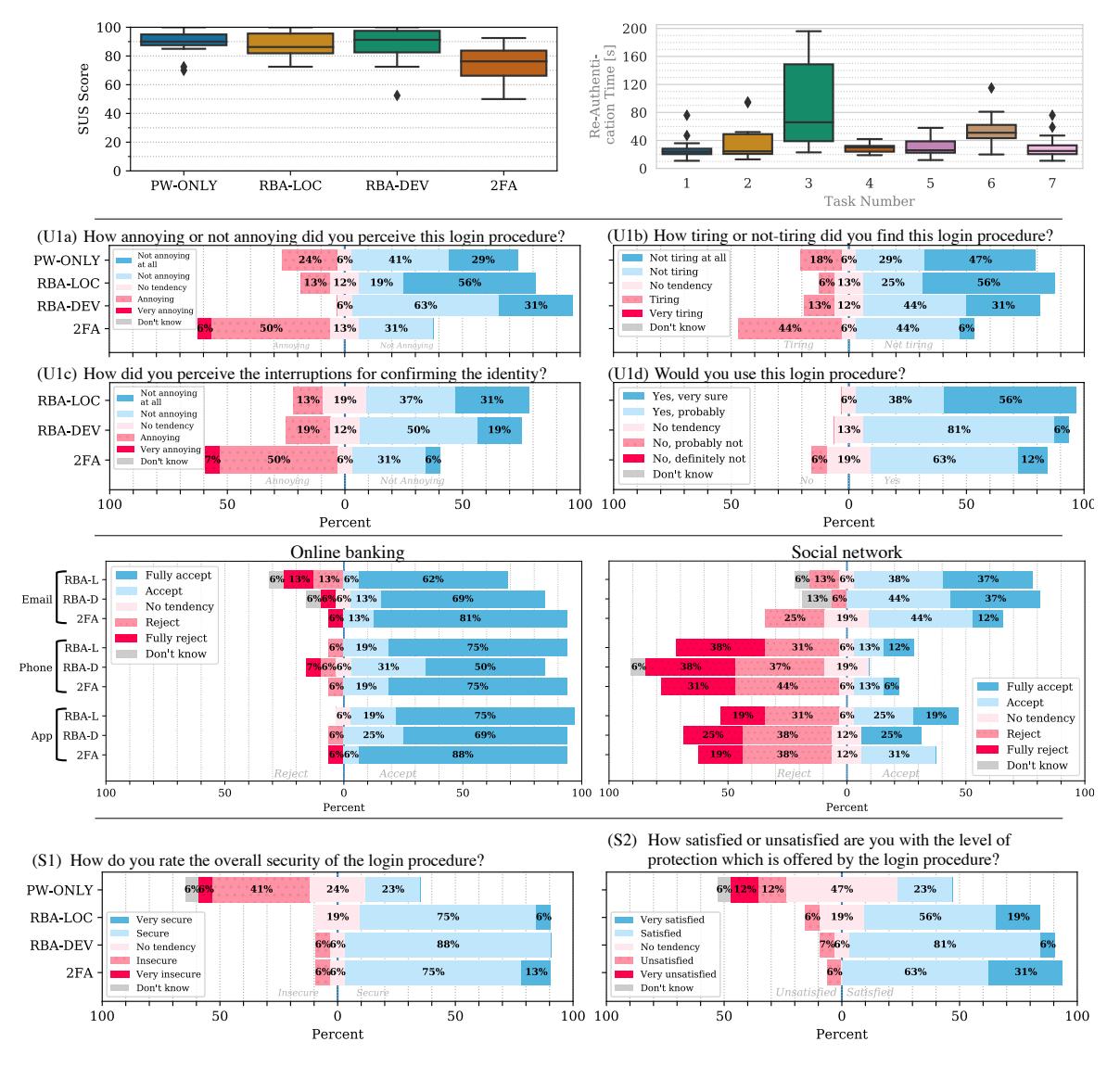
Figure 3. Top Left: Login procedure usability (U2): Box plot showing the SUS scores for the study conditions. PW-ONLY and RBA-DEV had significantly higher usability than 2FA. Top Right: Overview of the reauthentication duration in the individual tasks. All participants switched their devices in tasks three and six. Middle Top: Responses to the user acceptance questions (U1). Middle Bottom: Context-based user acceptance (U3) responses for websites with different types of sensitive personal data involved (online banking and social network). Bottom: Participant responses for security perception (S1) and level of protection (S2).
“[It was] Cumbersome effort. If you had to check email again, then copy this code and go to the website again. It was just a few seconds, but, yeah, not so nice.” (P35)
When asked for re-authentication, participants needed significantly more time to authenticate than without re-authentication, due to the requested additional step. Therefore, frequent logins increased the total authentication time and decreased usability and user acceptance.
All participants had to enter their login credentials in every task, including those of PW-ONLY. Since there was no additional security measure in this condition, PW-ONLY participants did not understand why they had to enter the credentials every time. This explains the slightly increased, but not significant, ratings for annoying (U1a) and the lower outliers in the SUS scores (U2).
The SUS scores regarding the website usability were not significantly different. However, 2FA received significantly lower scores in some SUS subquestions. Only the authentication method changed between the four study conditions. Therefore, the tendency could be that a bad usability of the authentication method also influences the perception of the overall website.
Context-based User Acceptance (U3) Participants of the RBA and 2FA conditions rated their willingness to use their login procedure in three different scenarios. In these scenarios, they either had to provide their email address or mobile phone number to the online service, or had to install an authenticator app on their smartphone. The rating was given for seven different types of websites. Based on our classification, the website types ranged from payment data (online banking, online shopping) and personal data (email provider, social network, online storage) to less personal data (video website, comment function on a news website).
Except for news website, email was generally higher accepted than phone number or authenticator app for all three authentication schemes. The differences were significant in many use cases. In the online banking context, however, also phone number and authenticator app were highly accepted (see Figure 3).
Discussion:
The results indicate that there is a willingness to provide the mobile phone number for RBA or 2FA if very sensitive personal data or payment data is involved on a website. However, personal trust in the online service seemed to be equally important, too:
“[I’m not providing my phone number] because […] I made experiences in the past where I […] received some curious messages, although I only wanted to log in in a secure way.” (P17)
Another explanation why users rejected to provide their mobile phone number on some websites was that phone numbers were regarded as more sensitive data than email addresses. This is in line with previous research [5].
“I have the feeling that my phone number involves more privacy than an email.” (P38)
“I don’t like it when so many websites have my [cell phone] number.” (P60)
Understanding Re-Authentication (U4) Participants of RBA and 2FA conditions rated whether or not they understood the re-authentication. The large majority of all participants understood the re-authentication.
Discussion:
Most of the RBA participants (RBA-LOC: 13/16, RBA-DEV: 15/16) mentioned in the semistructured interview that this re-authentication step came after something in the behavior had changed, which were device or location:
“If the devices change? I logged in […] via [desktop] PC and […] tablet. It’s also location-dependent, I guess.” (P17)
These results support that the majority of all participants understood the occasional reauthentication and associated it with changing situational settings.
Security Perceptions
Following the usability perceptions, we evaluate and compare the security perception and perceived level of protection of the studied authentication variants. We also identify contexts in which users feel adequately protected by RBA or 2FA.
Security Perception and Level of Protection (S1, S2) All participants rated the overall security and perceived level of protection of their authentication method. The results show that the participants found RBA and 2FA significantly more secure than PW-ONLY (see Figure 3). Similarly, RBA and 2FA participants were significantly more satisfied with the level of protection than the PW-ONLY participants. There were no significant differences between 2FA and both RBA conditions.
Concluding the results, users feel significantly more secure and protected when re-authentication was requested at least once. Thus, the security perception and perceived level of protection of RBA is significantly higher than password-only authentication and comparable to 2FA.
Discussion:
Participants of the two RBA conditions considered their respective authentication method as secure, since they assumed that attackers would need access to personal devices or email accounts for a successful login.
We also assume that the re-authentication played a major role for the high sense of protection. When getting into detail, all of the 2FA and RBA participants named the re-authentication as the reason for feeling protected:
“I have the feeling that it gives you more security. Especially since […] my email account was hacked [in the past] and that’s why it was good that you just don’t get in with [only] the login credentials.” (P20)
“When I was sitting over there in […] room [B], I had to enter this code […], which they had sent me by email. […] It just somehow gives you a higher feeling of security.” (P28)
We conclude that RBA has to be visible to users to increase security perceptions compared to password-only authentication.
Context-based Level of Protection (S3) All participants rated their satisfaction with the level of protection if the corresponding authentication method would be provided in the same manner on seven different types of websites. The website types were identical to those mentioned in the questions for context-based user acceptance (U3). Some use cases resulted in significantly higher satisfaction with the level of protection than those of PW-ONLY. These were RBA-LOC and 2FA in the online shop context, RBA-LOC in the social network context, and 2FA in the online banking context.
Discussion:
Online banking and online shopping involves sensitive financial data. For this reason, participants had higher demands on security than on usability in this context, as some 2FA participants noted:
“So with regard to the data that was in circulation there […], I think it makes sense that there is such a two factor authentication. If it were to be used for less sensitive data, I’d rather not have this feature, so I could get my data faster.” (P38)
Besides that, we consider RBA to be suitable for contexts that involve personal data, but with lower sensitivity than online banking. Especially in these contexts, RBA outweighs password-only authentication in terms of satisfaction with the level of protection.
LIMITATIONS
As in similar studies, the results are limited to a part of the population of a certain country. We sampled in a country where the population is legally obliged to use 2FA for online banking and e-government. Thus, our results are applicable for societies that are used to daily 2FA use. To ensure that this is true for our sample, we asked for prior 2FA experiences in the semi-structured interview (14/16 2FA participants stated they had).
We expect that RBA-based requests for reauthentication occur less frequently in daily life than in the lab study [4]. Therefore, we assume that the results of the RBA conditions were more negative than in real life.
We designed the tasks with the primary goal to allow fair comparisons of RBA’s and 2FA’s user perceptions. 2FA using another second factor, e.g., biometrics, may offer better usability, but the same would also apply to RBA using the same biometric re-authentication scheme. The number of re-authentication steps remains the same, regardless of the re-authentication factor. Some 2FA solutions provide a “remember me” option that deactivates requesting the second factor, or even both factors, for a specific time. We see the fact that some services offer this option as an indicator that users are annoyed by frequent re-authentication. Again, for comparison and fairness reasons, we chose not to include a “remember me” function for all authentication schemes studied.
RELATED WORK
The literature on the usability and security perception of RBA is rather thin. In a study observing real-world online logins of 780 users of a real-world online service for almost 2 years, we evaluated RBA’s usability and security characteristics [4]. The results show that RBA rarely requests re-authentication, even when blocking
very intelligent attackers. We also evaluated three RBA re-authentication methods on more than 500 users [8]. The results confirm that emailbased RBA re-authentication takes more than 20 seconds on average.
Related studies investigated usability aspects of 2FA and Implicit Authentication (IA). Some of the main outcomes, which also confirmed our results, were that users found 2FA more secure than single factor authentication [9]. Also, code-based 2FA received SUS scores below 80 [10], lower scores than password-only authentication [11], and was only preferred for online banking [12], [13]. Beyond that, more interruptions for authentication were found more annoying [14], [15].
TOWARDS RBA DEPLOYMENT
Our results provide several insights that can help developers and service owners in deploying RBA in practice. We discuss these in the following.
Context is Important
Our study results show that users perceive RBA as more secure than password-only authentication and more usable than comparable 2FA variants. However, RBA’s user acceptance depends on the type of website and the device on which it is mainly used. For example, requesting email-based re-authentication on a TV screen, which one participant experienced with the video streaming service Netflix, is unlikely to be accepted:
“because […] I want to log in quickly and watch something now.” (P31)
Otherwise, when a certain amount of sensitive data is stored on the corresponding website, users tend to accept RBA and feel protected. Only for high security demands, such as posed by online banking, 2FA is preferable over RBA, due to the higher feeling of protection in this context. That said, the EU Payment Services Directive (PSD 2) requires online banking services to use 2FA anyway.
Designing Re-Authentication
When the context fits the accepted RBA use cases, we can proceed with designing RBA implementation details. Possible re-authentication methods vary widely in practice [3]. For instance, social networks could request users to identify faces of some of their contacts. If users registered a smartphone to online services, the services could ask users to press a confirmation button on these devices. Classical security questions such as “what’s your pet’s name”, however, should never be asked, as attackers can obtain the requested information via social engineering or social networks.
Email-based re-authentication is a good starting point, and our participants mostly accepted this re-authentication method. Also, email addresses are often used for account registration, so this data is already available at many online services. There are multiple ways to implement this re-authentication, ranging from different authentication code based variations to clicking a link (“magic link”) [8]. Regarding performance and user acceptance, using a code in subject line and body performed better than the link-based variation when we studied it on more than 500 users [8].
The Deadlock Problem
It can become especially tricky if access to the re-authentication factor (e.g., email address) is also protected with RBA, as this could result in locking out users.
For instance, when users are at another location and try to sign into an online service, RBA can ask them for additional authentication via email. As a result, they try to sign into their web-based email account to get the authentication code. However, when the email service also uses RBA, it asks for additional verification as well. When users are not able to fulfill this second request, this would result in a deadlock.
Around 20% of our participants had this deadlock problem when using Gmail as their email provider after switching from room A to room B (see Figure 4).
We had the impression that this deadlock resulted in a frustrating user experience. Participants affected by the deadlock showed a negative facial expression or even verbally expressed their frustration:
“That’s annoying. I’m not a fan of twofactor authentication.” (P22)
Even when users acknowledge the security benefits of an authentication method: When users
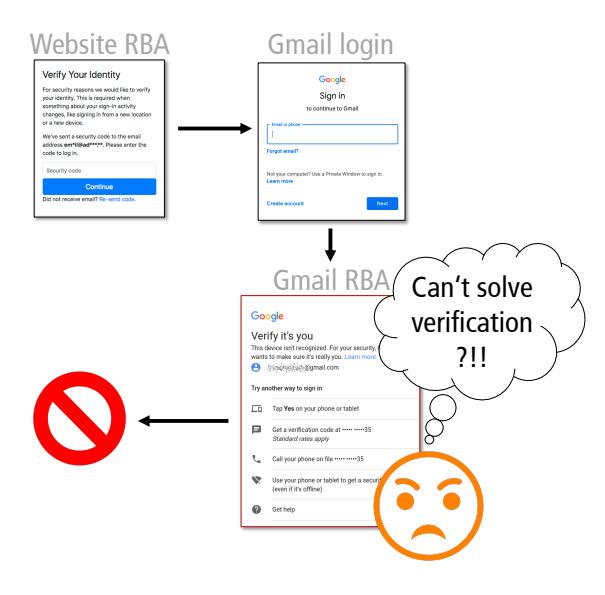
Figure 4. Overview of the deadlock problem discovered in the study
perceive such a security measure as a barrier, we assume that these are likely to disable the reauthentication, if possible.
“At some point I didn’t have the iPad with me [which was needed to log in]. I just had the iPhone and then I couldn’t get in[to the account]. That was […] where I said, ‘this is preventing me from working now, so unfortunately I have to turn it [2FA] off again’.” (P38)
Resolving this deadlock problem while maintaining security for user accounts is a complex task. Especially when the email provider uses RBA as well, users will not be able to access their accounts. A solution to this problem can be to increase transparency about RBA being active. Thus, users would expect re-authentication requests on some occasions and would carry their verification devices more likely. As an alternative, online services could offer re-authentication methods that do not require a second device.
Selecting Features
RBA estimates the risk score based on a set of features, which has to be defined by administrators, and the choice of features can have significant influence on both the resulting security and usability. After studying a large range of possible features of 780 users over almost two years, only few features qualified for RBA use [4]. The most effective ones with good security and usability properties were server originated. These covered network-based (IP address, autonomous system number, and round trip time), and behavior-based features (weekday and hour of login). As an additional signal to detect attacks, these can be combined with client originated features, e.g., user agent string.
Privacy
As only few features need to be stored to achieve good RBA performance, this is good for privacy. Most of them can also be truncated and hashed without affecting the results. This supports the enforcement of data minimization and purpose limitation under the GDPR. However, users may still consider some of the collected data to be sensitive. For instance, our participants rejected providing their phone numbers in many use cases. Thus, service owners should carefully evaluate all collected data regarding their privacy to retain a high user acceptance for their RBA deployment.
Deploying to Users
Our results indicate that users have a demand for strong security on websites, especially when sensitive data is involved. In contrast to 2FA, RBA can provide this security with minimal burden on the user [8]. Hence, almost all websites involving sensitive data should consider rolling out RBA to protect their users.
There are multiple ways to achieve this. Various commercial providers already offer readyto-use RBA solutions. However, some of them are external cloud-based services, which operate on submitted feature data. Besides these, there are also few RBA algorithms known in literature, which can be used locally [4]. As a result of our evaluations, we plan to release a RBA solution as open source software in the future. This can support small and medium-sized websites to protect their users with RBA and thus increase RBA adoption in the wild.
ACKNOWLEDGMENT
This research was supported by the research training group “Human Centered Systems Security” (NERD.NRW) sponsored by the state of North Rhine-Westphalia.
REFERENCES
- 1. S. Wiefling, M. Durmuth, and L. Lo Iacono, “More ¨ Than Just Good Passwords? A Study on Usability and Security Perceptions of Risk-based Authentication,” in ACSAC ‘20, Dec. 2020.
- 2. D. Freeman, S. Jain, M. Durmuth, B. Biggio, and G. Gi- ¨ acinto, “Who Are You? A Statistical Approach to Measuring User Authenticity,” in NDSS ‘16, Feb. 2016.
- 3. S. Wiefling, L. Lo Iacono, and M. Durmuth, “Is This ¨ Really You? An Empirical Study on Risk-Based Authentication Applied in the Wild,” in IFIP SEC ‘19, Jun. 2019.
- 4. S. Wiefling, M. Durmuth, and L. Lo Iacono, “What’s ¨ in Score for Website Users: A Data-driven Long-term Study on Risk-based Authentication Characteristics,” in FC ‘21, Mar. 2021.
- 5. E.-M. Schomakers, C. Lidynia, D. Mullmann, and ¨ M. Ziefle, “Internet users’ perceptions of information sensitivity – insights from Germany,” IJIM, vol. 46, Jun. 2019.
- 6. M. L. McHugh, “Interrater reliability: the kappa statistic,” Biochemia Medica, vol. 22, Oct. 2012.
- 7. J. Sauro and J. R. Lewis, Quantifying the user experience, 2012.
- 8. S. Wiefling, T. Patil, M. Durmuth, and L. Lo Iacono, ¨ “Evaluation of Risk-based Re-Authentication Methods,” in IFIP SEC ‘20, Sep. 2020.
- 9. N. Gunson, D. Marshall, H. Morton, and M. Jack, “User perceptions of security and usability of single-factor and two-factor authentication in automated telephone banking,” Computers & Security, vol. 30, no. 4, Jun. 2011.
- 10. C. Z. Acemyan, P. Kortum, J. Xiong, and D. S. Wallach, “2FA Might Be Secure, But It’s Not Usable,” HFE ‘18, Sep. 2018.
- 11. K. Reese, T. Smith, J. Dutson, J. Armknecht, J. Cameron, and K. Seamons, “A Usability Study of Five Two-Factor Authentication Methods,” in SOUPS ‘19, 2019.
- 12. J. Reynolds, T. Smith, K. Reese, L. Dickinson, S. Ruoti, and K. Seamons, “A Tale of Two Studies,” in SP ‘18, May 2018.
- 13. J. Dutson, D. Allen, D. Eggett, and K. Seamons, ““Don’t punish all of us”,” in EuroUSEC ‘19, Jun. 2019.
- 14. H. Crawford and K. Renaud, “Understanding user perceptions of transparent authentication on a mobile device,” Journal of Trust Management, vol. 1, Jun. 2014.
- 15. H. Khan, U. Hengartner, and D. Vogel, “Usability and Security Perceptions of Implicit Authentication,” in SOUPS ‘15, Jul. 2015.