



Abstract: Software development is a complex task. Merely focussing on functional requirements is not sufficient any more. Developers are responsible to take many non-functional requirements carefully into account. Security is amongst the most challenging, as getting it wrong will result in a large user-base being potentially at risk. A similar situation exists for administrators. Security defaults have been put into place here to encounter lacking security controls. As first attempts to establish security by default in software development are flourishing, the question on their usability for developers arises.
In this paper we study the effectiveness and efficiency of Content Security Policy (CSP) enforced as security default in a web framework. When deployed correctly, CSP is a valid protection mean in a defence-in-depth strategy against code injection attacks. In this paper we present a first qualitative laboratory study with 30 participants to discover how developers deal with CSP when deployed as security default. Our results emphasize that the deployment as security default has its benefits but requires careful consideration of a comprehensive information flow in order to improve and not weaken security. We provide first insights to inform research about aiding developers in the creation of secure web applications with usable security by default.
1. Introduction
Security by default has shown to be an effective measure in information systems administration. Especially non-security information workers do benefit from safeguards being in-place by default as this avoids vulnerabilities resulting from a lack of knowledge, comprehension or attention. Consequences that may result from an absence of security defaults are documented numerously. Examples span from publicly accessible Internet-connected personal devices (Tekeoglu and Tosun, 2015) and industrial machines (Bodenheim et al., 2014) to database servers providing all kinds of data (Heyens et al., 2015). With digital products and services respecting the security by default principle, these types of vulnerabilities are much more unlikely to appear. Still, the security defaults need to be carefully considered from a user-centred perspective. Otherwise the protection measures are perceived as a burden (National Cyber Security Centre, 2016). Random generated passwords used only once per device and printed on its respective case can be named as an example which is commonly applied on some class of Internet-connected products (e.g. wireless access points) (Lorente et al., 2015).
As security by default proves to be beneficial in systems administration, the question arises whether it can also have a positive impact on software development. Even without a deep understanding about risks and attack models, domain specific security functionalities can be delivered by non-security specialists out of the box. In contrast, without security defaults, programmers must design and implement every protection feature by themselves.
Modern web frameworks support developers with implementing feature-rich and complex web applications in a structured and systematic manner. Due to many potential attack vectors and mandatory security requirements like authentication and authorization, input validation or secure communications, developing secure web applications is a challenging task (Lo Iacono and Gorski 2017). The “OWASP Top 10” (The OWASP Foundation, 2017) lists the ten most critical security risks in the context of web applications. Hence, web frameworks do include a range of security features with the intention to assist developers with applying respective countermeasures, often by enforcing suitable defaults. Many web frameworks take, e.g., the responsibility for implementing defences against Cross-Site Request Forgery (CSRF) (The OWASP Foundation 2017) attacks to avoid delegating this task to their users. One indication for this approach being effective is the vanishing of CSRF attacks from the latest “OWASP Top 10” list after being a permanent member for many years. In cases, in which the responsibility for implementing a security feature is neither clearly assigned nor communicated, the lack of sensible security defaults can lead to severe vulnerabilities. This has been shown by a qualitative usability study on how web developers deal with password storage (Naiakshina et al., 2017). Since common web frameworks leave the developers alone with implementing a password database, many developers forget to hash and salt the passwords before storing them. This emphasizes that when developers get digital security wrong, this potentially impacts the security and privacy of a large user base.
In this work we focus on the Play Framework for Java and its design decision to enforce Content Security Policies (CSPs) (W3C, 2016) by default. CSPs are a mean against Cross-Site Scripting (XSS) (Vogt et al., 2007) attacks which are part of the “OWASP Top 10” for many years and are ranked as number seven in the recent version. In a laboratory experiment we first evaluate the effect of integrating CSPs by default. Second, we compare how violations of CSPs are communicated to developers by the two browsers Chrome and Firefox which are using different design approaches for their CSP violation messages.
To be able to improve the usability of CSPs in software development frameworks, we want to give evidence to usability issues and quantify specific points of failures. This led us to the following research questions:
RQ1: How does the enforcement of CSP by default affect usability?
RQ2: Are state of the art implementations of CSP warnings an effective measure to support software developers with needed information?
2. Content Security Policies (CSPs)
CSPs (W3C, 2016) enable web application developers to declare if and what external artefacts can be loaded and included on a web page (Stamm et al., 2010). The corresponding rules are sent within the HTTP response header “Content-Security-Policy” from the web server to the client. In case a HTTP response contains such a header, the web browser enforces the policies to the containing HTML page and its embedded sub-resources including e.g. images, fonts, styles and scripts. External subresources that are not complying with the specified rules will be rejected. Detected violations of CSP rules are communicated via red coloured messages with small warning icons in the browser’s console. Example messages printed by Chrome and Firefox are depicted in Figure 1. CSP-instrumented browsers are available since 2015. Today, the latest versions of all major desktop and mobile browsers support CSP (Can I use, 2018). Thus, when deployed carefully, CSPs provide an effective mean to prevent content injection-based attacks like XSS (Stamm et al., 2010; W3C, 2016) as a second line of defence behind measures like input validation or sanitisation.
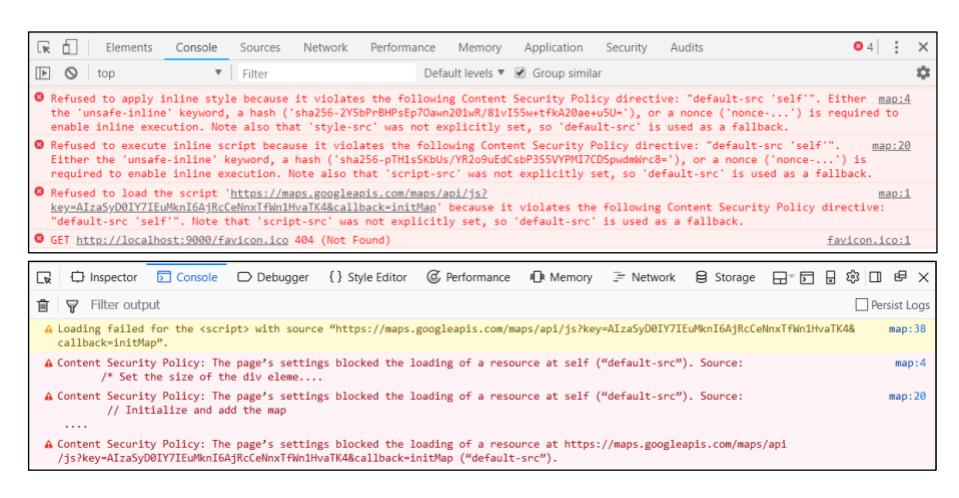
Figure 1: Example CSP violation messages displayed in Chrome (top) and Firefox (bottom). The messages were triggered by integrating Google Maps example code into an HTML template file in the context of a Play Framework based web application
CSP messages in browser consoles are no warnings in a narrow sense. Typically, warning messages try to communicate the risk of an insecure situation to the user giving crucial information which should help making an informed decision. Those are following and implementing the “Warn when unsafe” pattern proposed by (Garfinkel 2005). In contrast, CSP warnings display information about a CSP rule violation. Thus, this is a message of an enforced protection giving the information that a potential risk has been prevented, similar to messages of virus scanners or firewalls. Since CSP messages in a console are nevertheless designed in the shape of warnings or errors, we like to discuss if this rather follows by a “Warn when safe” pattern which has not yet been proposed in a software development context.
| Web Framework | Programming Language | Content Security Policy Support | |
|---|---|---|---|
| Play Framework | Java / Scala | ●/● | Available / |
| included and enforced by default | |||
| Spring / Spring Boot | Java | ●/○ | Available (Spring Security Module) / |
| neither included nor enforced by default | |||
| Ruby on Rails | Ruby | ●/◐ | Available (since Rails 5.2) / |
| included but not enforced by default | |||
| Express.js | JavaScript | ●/○ | Available (helmet-csp middleware) / |
| neither included nor enforced by default | |||
| Meteor | JavaScript | ●/◐ | Available (browser-policy package) / |
| not included but enforced by default | |||
| Django | Python | ●/◐ | Available (Django-CSP middleware) / |
| not included but enforced by default | |||
| Flask | Python | ●/◐ | Available (flask-csp extension) / |
| not included but enforced by default | |||
| Laravel | PHP | ●/◐ | Available (laravel-csp middleware) / |
| not included but enforced by default | |||
| Symfony | PHP | ○/○ | Not available / |
| CSP header must be set manually | |||
| Gin | Go | ●/◐ | Available (e.g. Secure middleware) / |
| not included but enforced by default | |||
| BeeGo | Go | ○/○ | Not available / |
| CSP header must be set manually | |||
| ASP.NET | C# | ●/◐ | Available (e.g. NWebsec library) / |
| not included but enforced by default |
Table 1: List of popular web frameworks for the 2017 top programming languages Python, Java, C#, JavaScript, PHP and Go (Cass, 2017) and their available support for CSP
To integrate CSPs, software developers are required to configure their server-side web application to send a corresponding “Content-Security-Policy” HTTP header with each HTTP response. Several web frameworks ease this process and offer possibilities to activate CSPs in their configurations with little effort (cf. Table 1). However, in contrast to an easy integration of CSPs in web development frameworks, previous work showed that a secure deployment is difficult (cf. Section 3).
3. Related Work
As identified by large-scale analysis (Weissbacher et al., 2014; Patil and Frederik 2016; Weichselbaum et al., 2016; Calzavara et al., 2018), misconfiguration of CSP is a key factor harming the effective implementation in deployed web applications. (Calzavara et al., 2018) described five categories of typical misconfiguration: Typos and negligence, ill-formed policies, lack of reporting, harsh policies and vulnerable policies. In our study we could observe similar categories of vulnerable policies (cf. Section 5). In contrast to their methodology, only analysing already deployed policies, we present the first study to the best of our knowledge evaluating usability issues developers have when working with CSP enabled by default.
Warning messages in the console environment to support developers are hardly being explored. Only recently (Gorski et al., 2018) found evidence for this type of warnings being effective in the context of API (Application Programming Interface) integrated security advice. Warnings were triggered by a Security API if insecure algorithms or parameters were used by developers for encryption or hashing and were displayed in the developers’ programming console. In contrast to their work, we do not test an own or improved warning message design. In this work, we evaluate the current state of the art implementations of CSP console warnings in the Chrome and Firefox browsers in the situation of default CSP enforcement by the Play Framework.
Programmers have specific needs for information which cannot only be satisfied by warning messages. Using community driven Internet resources like Stack Overflow comes with the risk of adopting insecure code examples compared to official documentation web sites giving good security advice but showed to be less usable (Acar et al, 2016). (Acar et al, 2017b) evaluated 19 general online resources offering advice about secure programming. They described a very fragmented landscape in terms of topicality, content organization and covered topics, thus being limited supportive for specific and urgent information needs. However, we decided to allow participants of our study to use Internet search engines and any available online resource or CSP tooling to fulfil the programming task in the way they are used to and would typically use when not being in a usability study.
4. Methodology
We applied the following methodology to measure the effect of a whitelisting originonly CSP enabled by default, only allowing sub-resources deriving from the same server as the embedding web page. We also wanted to compare possible effects on how CSP violations are communicated towards developers by the browsers Chrome and Firefox with their different design approaches for CSP violation messages.
4.1. Task Design
Participants were asked to integrate a map of the web mapping service Google Maps inside of a simple web application serving exactly one web page containing the map. The corresponding map should have a height of 400 pixels and a width of the browser window and should focus the Cologne Cathedral with a visible marker. The required geolocation coordinates were stated in the task. Also, a Google Maps API key was made available inside a text file.
We selected the official “Play Java Starter Example” (Play Framework, 2018b) for the latest Play version 2.6 to set up the study task. This template project was created especially for Play beginners. Thus, developers find well commented code and links to further documentation. This template was slightly extended by adding a “/map” resource path to the application by editing routes and adding a controller and a view with a prepared HTML scaffold for orientation at what position the map could be integrated. In the Control group CSP was deactivated by editing the application’s configuration file as CSP is enabled by default within the Play project.
The participants had to write the code inside the IntelliJ IDEA IDE (Integrated development environment) (IntelliJ IDEA Web Site, 2018). The IDE IntelliJ IDEA Ultimate was chosen due to possession of the features syntax highlighting, autocompletion, on-the-fly compilation, assisted refactoring and debugging. In addition, the Model-View-Controller (MVC) (Krasner, 1988) project structure appeared to be easily accessible with this IDE. The task was considered as fulfilled if the Cologne Cathedral was displayed inside the corresponding browser (Chrome or Firefox) comparable to the screenshot depicted in Figure 2. We aborted the task if the participant’s work on the solution had exceeded a duration of one hour.
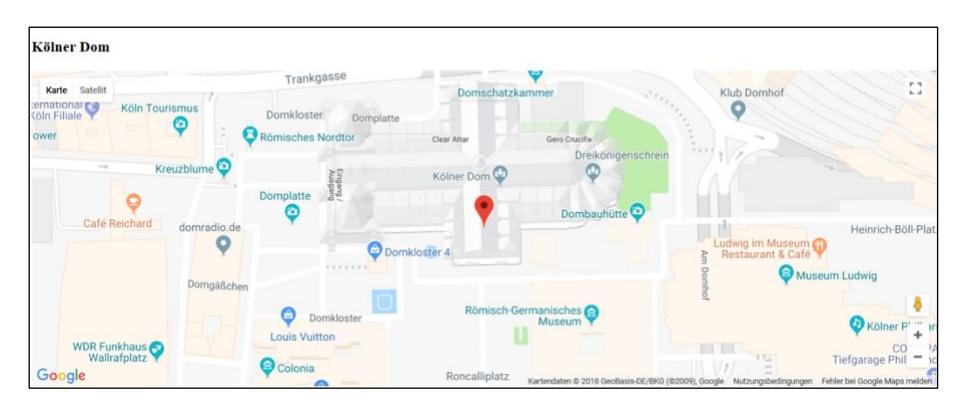
Figure 2: Browser screenshot of the solved task showing the successful integration of a Google Maps via the Google Maps JavaScript API positioned to the Cologne Cathedral
The secondary task, which was not mentioned in the task description, was to handle the CSPs, which were enforced by the Play Framework. Listing 1 illustrates how a secure CSP for our study task looks like. All inline scripts and styles from the Google Maps documentation example (Google Maps, 2018) were placed into external server files to both prevent XSS attacks and enable flexibility on editing script code. The value “self” references to files which are placed on and delivered by the server and excludes inline scripts. Script, style, image and font sources were defined separately. Inline styles which are allowed to be loaded from Google Maps were defined as Base64 encoded SHA256 hashes. The resulting CSP has to be placed inside the “application.conf” file of the Play project.
The messages logged in the console of Chrome and Firefox differ in terms of the provided information (cf. Figure 1). Thus, assuming that participants follow the hints given by the CSP violation messages inside the Chrome’s JavaScript console, an expected possible solution might look similar to Listing 2. Chrome provides hints on how certain CSP conditions for a given violation could be corrected on each occurred CSP violation message (cf. Figure 1). For instance, for enabling inline execution it is required to add “unsafe-inline”, a hash or a nonce to the policy. However, after whitelisting a given CSP violation in the Google Maps example, additional CSP violation messages appear inside the console since additional external resources (fonts, images, inline styles) are subsequently loaded by the CSP-enabled Google Maps scripts and style files. All CSP violation messages could be eliminated after five policy adjusting iterations with the result of Listing 2. According to security checks proposed by (Weichselbaum et al., 2016) we assume that this is a secure solution. However, due to the presence of “localhost:9000” inside the CSP, the result might not work on a production server. Chrome did not give a hint to use the “self” value which references to the same origin (same scheme, host and port) as the web page.
contentSecurityPolicy = "
        default-src 'self';
        script-src 'self'
                 https://maps.googleapis.com/;
        style-src 'self'
                 https://fonts.googleapis.com/
                  'sha256-UvsJ5gtL0c/whxmyVt4YoNv7YnPUd0tANZOlq3NshXE='
                  'sha256-5KvpSTE2xdGq8rDdvgAPP3mCfTXBc1ohjt2UiAQt9k4='
                  'sha256-/VVOq+Ws/EiUxf2CU6tsqsHdOWqBgHSgwBPqCTjYD3U='
                  'sha256-a2VR/Wq1VPr0+3GRY+lEmAQm7wjwwnDtPpcCPs2zTrw='
                  'sha256-/4YlUlisxufO6wbKvYp4xV8Hkzxm85+1Tb31SjmAox0='
                  'sha256-47DEQpj8HBSa+/TImW+5JCeuQeRkm5NMpJWZG3hSuFU=';
        img-src https://maps.gstatic.com/mapfiles/
                 https://maps.googleapis.com/maps/;
        font-src https://fonts.gstatic.com/s/
"
Listing 1: Sample solution of a Content Security Policy for our study task. Line breaks and indentations were inserted to improve readability.
contentSecurityPolicy = "
        default-src 'self';
        script-src http://localhost:9000/assets/javascripts/map.js
                 https://maps.googleapis.com/;
        style-src https://fonts.googleapis.com/
                 http://localhost:9000/assets/stylesheets/styles.css
                  'sha256-UvsJ5gtL0c/whxmyVt4YoNv7YnPUd0tANZOlq3NshXE='
                  'sha256-5KvpSTE2xdGq8rDdvgAPP3mCfTXBc1ohjt2UiAQt9k4='
                  'sha256-/VVOq+Ws/EiUxf2CU6tsqsHdOWqBgHSgwBPqCTjYD3U='
                  'sha256-a2VR/Wq1VPr0+3GRY+lEmAQm7wjwwnDtPpcCPs2zTrw='
                  'sha256-/4YlUlisxufO6wbKvYp4xV8Hkzxm85+1Tb31SjmAox0='
                  'sha256-47DEQpj8HBSa+/TImW+5JCeuQeRkm5NMpJWZG3hSuFU=';
        img-src https://maps.gstatic.com/mapfiles/
                 https://maps.googleapis.com/maps/;
        font-src https://fonts.gstatic.com/s/
"
Listing 2: Content Security Policy generated by following the advice provided with the CSP violation messages listed in the developer console of Google Chrome. Line breaks and indentations were inserted to improve readability.
Since Firefox only provides messages relating to the directive on which the policy violation has occurred and the blocked URL, we expect participants to copy the exact URL to the directive to remove this violation. However, many CSP messages follow after this procedure, since Google Maps reloads a high number of external resources (e.g. images). Since no additional hints are given to add the approximate path instead of the exact filename, we assume it is not possible to implement a CSP only with the information given by Firefox without consulting external resources.
4.2. Study Design
We conducted a between subjects laboratory experiment with three groups. A Control group was working on the task with disabled CSPs while using the Chrome browser. Another two groups differed by the used browser: Chrome or Firefox; both with CSP enabled. We chose these three conditions to (1) compare the times needed to fulfil the task with the Chrome browser and enabled or disabled CSPs. (2) We wanted to evaluate whether there is an effect triggered by the differently designed CSP violation messages in Chrome and Firefox. The presence or non-presence of CSPs was not communicated to the participants.
Due to the highest market share among web browsers (W3Schools, 2018), Chrome was chosen for the Control group. We assumed a second Control group with Firefox as not being necessary since the solution procedures for the given task are almost identical to Chrome.
Test persons were advised to use the official Google Maps JavaScript API documentation (Google Maps, 2018) as a starting point, but they were free to use all available Internet resources. The participants were asked to think aloud during the programming task. Audio and video were recorded with the recording software OBS Studio (Open Broadcaster Software, 2018). The video included the screen content. In addition, a small-sized video of the participant taken by the display webcam was placed in the bottom right corner. During the study observation, we used a selfdeveloped audio and video stream annotation system to manually document actions and key events associated with automatically generated real time stamps. After the experiment, it was possible to add the corresponding video file into the software and jump on klick to the according time in the recording for review, analysis and coding.
In a semi-structured exit interview, we obtained additional data. The questions comprised self-assessments of functionality and security regarding the developed web application as well as basic questions about previous experiences with operating systems, Play Framework, IntelliJ IDEA, CSPs and (secure) software development.
4.3. Experiment Procedure
Participants were assigned by round robin to the three experiment conditions. After welcoming the participant and offering water and candy bars, a consent form was explained and signed by all participants of the study. Our institution does not have a formal IRB process for computer science studies, but we took care that our study complied with the European General Data Protection Regulation (The European Union, 2016). In the next step, all participants were briefed for Play’s MVC paradigm in accordance with a briefing protocol. The Play development environment comprised of the integrated development environment (IDE) IntelliJ IDEA. The corresponding browser development tools of Firefox or Chrome were explained as well. Following the briefing, participants were handed a task sheet explaining and illustrating the primary programming task. After clearing general questions, the examiner started the recording and streaming by pressing a key combination on the keyboard, asked the participant to start and left the laboratory. The examiner followed the experiment by observing all participant’s actions via screen, video and audio transmission in a separate room next door, logging relevant actions with the developed audio and video stream annotation system.
The experiment was conducted inside a usability laboratory of our institute. The room used for the experiments was specifically designed to create a pleasant atmosphere for the participants. It was furnished comparable to a living and working room in order to avoid appearing as a “sterile experiment room”.
After task completion, the participants answered the questions of the semi-structured exit interview. Then the participants were informed about CSPs, the reason of choosing the Play Framework and the purposes of the secondary task. Participants were asked not to talk about these contents while the study was conducted.
We iteratively tested the study design and experiment procedure in a pilot study with three participants prior to the experiments. After analysing the results, the hardware and software setting of the underlying observation infrastructure as well as the exit survey and the task design were revised.
4.4. Recruitment
We invited 43 bachelor and master students of our faculty via email knowing that they have previous experience with web development, Java, JavaScript and the Play Framework. In the invitation email we asked them to participate in a study about web programming. We wrote that this study includes a small programming task in the premises of our university, which will last about one hour. We did not mention a security context or the Play Framework. Five candidates rejected and eight did not answer to the invitation, even after sending a reminder. The remaining 30 candidates voluntarily participated in the study within a period of three weeks in May 2018. We could not compensate them for their participation but offered water and candy bars for their physical wellbeing.
5. Analysis
In the following sections we present the results of our data analysis. First, we characterise our participants before analysing task solutions. We compare the Control condition with the Chrome condition to evaluate the effect of enabled or disabled CSPs on time needed to fulfil the task. It is evaluated whether we could observe an effect caused by different CSP violation message design approaches implemented in Chrome and Firefox. Furthermore, the functionality and security of task solutions are analysed.
5.1. Participants
The study took place in 2018 and was completed with 30 participants, ten in each condition. Their age was between 19 and 31 years (Mean 25.2, SD 3.1). Only one of the participants was female, all others were male. 19 were bachelor students (Mean semester 8.0, SD 2.2) and 11 were master students (Mean semester 2.2, SD 1.2).
Except of one person in the Control group, all had previously developed at least one web application in a university course. Their mean experience with software development in total was 4.1 years (SD: 2.3), 4.8 years (SD: 1.9) with the programming language Java and 2.4 years (SD: 1.4) with JavaScript. The lower value for the total experience in comparison to Java experience can be explained by the students not counting their first semesters of learning programming (typically with Java) to their experience with developing software applications. This was revealed during the interviews. 73% (22/30) had already been paid for programming, which indicates a certain level of professionalism in software development.
One third (10/30) never considered any security measure during software development. The others mentioned the application of scattered security functionalities in the interview including e.g. secure connections via TLS, input validation against Cross-Site-Scripting, authentication, authorization, session cookies and security tokens. Thus, the general experience with security in web development in this sample can be described as limited.
The participants were experienced with the offered development environment. Thus, during the experiments we did not encounter any problems triggered by our setup. Only two participants in the Chrome condition were not familiar with the Windows operating system and four had not used the Play Framework before (Control: 3; Chrome: 1). However, the latter four were able to finish the task comparably fast. 16 were familiar with the IntelliJ IDEA IDE, evenly distributed on the conditions (Control: 5; Chrome: 5; Firefox: 6). Every participant reported having used browser developer tools before.
5.2. Task Solutions
Figure 3 illustrates the distributions of total time needed by participants to solve the task in all three conditions. First, we compare the Control condition with the Chrome condition. In both of the groups with participants that used the Chrome browser, the independent variable was the default CSP behaviour of Play. The mean time in the Control group was 16 minutes (median = 9.9) in comparison to a mean time of 56.6 minutes (median = 60) in the Chrome group with CSPs enabled by default. The samples in the Chrome group are not normally distributed as seven of ten experiments in this group were aborted after a maximum task duration of one hour. Thus, the upper quartile is also the median (60 minutes). There is no time overlap between both conditions (Mann-Whitney U test; U=0; p<0.001). Thus, we can reject the null hypothesis; participants trying to solve the task in the Chrome group being confronted with CSPs needed significantly more time than participants in the Control condition with seven of ten participants exhausting the maximum study time of 60 minutes.
There is also a clear visual tendency that participants in the Firefox condition with enabled CSP by default needed more time to solve the task than participants in the Control condition with Chrome and disabled CSP (cf. Figure 3).
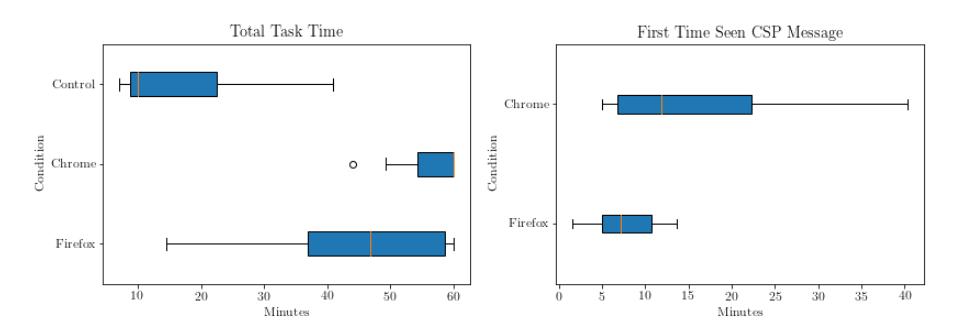
Figure 3: Comparison of total times to solve the task in all three study conditions (left) and of first time seen a CSP Message (right)
Second, we compare the processing time between the Chrome and the Firefox group, both conditions with enabled CSP by default (Mann-Whitney U test; U=24.5; p=0.022). The participants using the Firefox browser finished the experiment in a mean time of 43.8 minutes (median = 46.9). Thus, there is a statistical tendency of participants finishing the task faster in the Firefox condition (p < 0.05). In this group, three experiments needed the complete time frame of 60 minutes. This means in total we terminated 50% of all 20 experiments which included CSP by default after one hour. In each condition with CSP enabled by default, three participants had used CSPs before. However, none of them configured the policy securely. Three of these six participants did not solve the task in the given time frame of one hour.
5.3. Functionality and Security
To be able to assess whether a task solution was solved functional and secure, we coded the developed sources at the end of an experiment. The solution was rated as functional if the map was shown in the browser as demanded by the task description (cf. Section 4.1 and Figure 2). For the evaluation of security, we only focused on the CSP and followed the checks proposed by (Weichselbaum et al., 2016). The solution was rated as insecure if the keyword “unsafe-inline” was used without either noncesource or hash-source; an object-source was not explicitly nor implicitly set by the fallback default-source; or a wildcard was used in a whitelist. In addition, approaches which had switched off the CSP were coded as insecure. The coding results were compiled independently by two authors and were solved by discussion on mismatch. The security of non-functional solutions was not rated.
All solutions in the Control condition were functional in comparison to nine in the Firefox group and in contrast to only four in the Chrome group. The seven participants with non-functional solutions did not see any map in the browser (cf. Figure 2) during the experiment. Only one did not open the browser console and thus, did not see a CSP message. Three test persons saw and read the messages but were not able to find out how to proceed with the given information. The last three of the non-functional group tried to configure a CSP but were not able to find a policy that would have allowed to show the Google map.
In the semi-structured exit interview, participants were asked to rate their agreement to the statements “I think I solved this task correctly” and “I think I solved this task securely” on the following five-point Likert scale: strongly agree (5); agree (4); neutral (3); disagree (2); strongly disagree (1). The objective results for functionality are also represented in the subjective ratings with mean values of 4.8 (SD 0.4) in the Control, 4.3 (SD 0.9) in the Firefox and 2.8 (SD 1.3) in the Chrome condition.
None of the 20 participants in the Chrome and Firefox group developed a secure solution. Table 2 lists the reasons for insecure task coding, which appeared in our experiments.
| Chrome Condition | Firefox Condition | |
|---|---|---|
| Not functional | 6 | 1 |
| “unsafe-inline” | 1 “script-src”, 2 “script-src” and “style-src” | 2 “script-src”, 1 “script-src” and “style-src” |
| Wildcard | - | 1 “default-src *” |
| CSP = null | 1 | 3 |
| all security header filters disabled | - | 1 |
| all default filters disabled | - | 1 |
Table 2: Non-functional results and reasons for insecure task coding
It is striking that six test persons in the Chrome condition produced non-functional results. In the Firefox group it is remarkable that six participants just allowed all external sources to be included on the web site by disabling CSP completely or setting a default wildcard. The two test persons who disabled Play filters got the information from the official Play documentation web site, other two copied and pasted insecure code snippets from Stack Overflow posts. The remaining two unsuccessfully tried to configure a CSP but ended up with disabling the mechanism. These seven test persons who switched off CSP rated their solution’s security as low with a mean rating of 2.6 of 5 (SD: 0.9; median: 3.0). In the interview they explained “I set CSP to null (laughing) to bypass the error. Afterwards I didn’t configure it in more detail” 1 , “I had no choice” or “I disabled CSP to make it work”. The six participants who found a working CSP configuration using the directive “unsafe-inline” rated their application to be secure with a mean rating of 3.6 of 5 (SD: 0.7, median: 4.0). In fact, the application of “unsafe-inline” makes a CSP insecure.
1 All quotations are analogous translations from German to English.
In the following, we analyse if observations in both groups are related to the different CSP violation messages of Chrome and Firefox (cf. Section 2). Participants in the Chrome condition saw the CSP message in the browser console in mean after 17 minutes (median = 11.9) in comparison to a mean time of 7.5 minutes (median = 7.2) in the Firefox group (cf. Figure 3). The participants in the Firefox condition found the messages significantly (p < 0.05) earlier in the experiment than in the Chrome condition (Mann-Whitney U test; U=23.0; p=0.0396). However, as GUI-elements of the developer tools in Chrome and Firefox are almost identical to use and as we had briefed every participant about these tools (cf. Section 4.3), we assume that the significant difference is a result of software development being a high creative task, typically not following one specific behaviour pattern. Another reason for the significant difference between the Chrome and the Firefox group could be found in specific test persons’ individual characteristics which we did not measure. We were not able to find a significant difference in the total development experience between the two groups.
The first three reactions of each participant to the CSP violation messages in the browser’s console were diverse. They range from (a) initially ignoring it over (b) editing code on spec, (c) searching and checking project files to (d) reading in Play and Google Maps documentations and using a search engine. However, we could not find a statistical significant difference for subsequent actions indicating further information needs. The difference between the Chrome and the Firefox group in passed time before Google Search was used after seeing the CSP message was not significant (Firefox mean: 3.1 minutes, SD: 2.1; Chrome mean 3.6 minutes, SD: 2.9). Neither for entering CSP related key words like e.g. “default-src”, “unsafe inline” or “content security policy” into Google Search or into the search function of Play’s documentation the first time after having seen the CSP message (Firefox mean: 7.6 minutes, SD: 9.8; Chrome mean 12.1 minutes, SD: 16.0).
6. Discussion
The study results reveal several issues of Play’s design decision to enable CSP by default following the fail-safe defaults principle (Saltzer and Schroeder, 1975). It furthermore shows, however, that also the general web development environment contributes to the discovered issues as not all resides inside the frameworks sphere of influence, including e.g. CSP messages in browsers, IDE support and information given by service providers. Those will be discussed in the following sections. We give explicit answers to RQ1 in Section 6.1 and to RQ2 in Section 6.2.
6.1. CSP by Default
It came as a surprise and was an unexpected situation for all participants in the Chrome and Firefox condition when the map did not show up after integrating the code snippet provided in the Google Maps API documentation: “I’m not allowed to call the Google Maps API because of any security settings. This usually works.” There is a design shift from “developers have to switch on security” to “developers have to directly manage security”. Our results show a negative effect on functionality and security: 35% (7/20) of our participants in the Chrome and Firefox group with CSP by default were not able to achieve a functional solution and none of the 20 participants developed a secure solution.
The current design of the default origin-only enforcing CSP in Play resulted in developers being uncertain about the functionality of their code. This uncertainty had been further amplified by a lack of information about what was happening. Consequently, errors were assumed to be in the own source codes and caused the revision of various project files for functional or logical mistakes. The common trialand-error strategy failed as the security by default mechanism blocked the trials and left the developer with no additional hints on the cause of the non-functioning application. This leads to confusing an in-place security mechanism with flawed code. The observed program behaviour is regarded as a mistake sourced in the own implementations. To ensure that this is not the case or to finally get some insights on the problem cause, participants even used third party runtime environments like “JSFiddle” (JSFiddle, 2018) or created local HTML files outside the Play project to test their code. Two participants disabled all security headers (cf. Table 2) to identify a cause of the problem. Thus, the CSP integration design can lead to completely disabled security headers affecting also other security defaults or settings.
This emphasizes that informative feedback is crucial for developers to support them in narrowing down the real cause of a problem. Warning messages in the browser console are one pillar in this respect. Our study showed, however, that an effective information flow requires additional feedback at many more locations and layers within the development environment and during the development process respectively. As the developers do make extensive use of documentation, the enhancements of documentation with security-related aspects is one such missing piece. Thus, also service providers have an information obligation (Gorski et al., 2016) to add missing CSP-related information to their documentation (cf. Section 6.3). Web frameworks do have a special mode of operation while developing a web application. When this mode is enabled, the framework provides detailed error messages in respect to compile or runtime errors. This could be enhanced with feedback on the current state and context of the application. Along these lines, such a framework provided feedback could link to additional resources such as CSP generators (cf. Section 6.4).
6.2. CSP Violation Message Design
The design of CSP violation messages does influence the information flow too, as the situation hardly changed after participants had seen the CSP violation message. They had difficulties to understand the given indications in the browser console: “Honestly, I have no idea why the map isn’t displayed. The messages do not really explain that. It can’t be so difficult.” As proved by (Gorski et al., 2018) in the context of Security APIs, warning messages displayed in development consoles can be an effective measure to improve software security. But, in general, warning messages have to be designed with usability in mind to be beneficial for users (Bauer et al. 2013). CSP warnings presented by Chrome and Firefox could not help any of our participants to configure a functional and secure policy as information to four main questions were missing or unclear: What is triggering the message and what is the reason? How to configure CSPs and where to set them?
6.2.1. What is triggering the message and what is the reason?
CSP messages in Chrome and Firefox are designed in red colour to gather attention. Indeed, they were perceived by 19/20 of our participants when they opened the JavaScript console of the browser. They were mainly interpreted as errors (“Always the same error message, I’ve no idea what I can do with it”, “An error is displayed”). In fact, these messages give information about an enforced CSP which had been violated. Thus, this is a message of a working security mechanism in a safe situation which is perceived as an error. This safe situation had been changed to a more unsafe situation by 13/20 participants by disabling CSP and even further reaching other security means.
Adding a correct policy entry could result in many more messages showing up at the next test run. The amount of warnings displayed in our study was critical. Participants were confronted with many messages at once, with a maximum number of 105 triggered by loading many small images building the map. Participants had to iteratively edit the CSP to configure scripts, styles, fonts and images and control the effect to the messages displayed in the console. This required iterative process was a hurdle. When test persons just deactivated CSP, all messages disappeared.
Participants who switched off CSP completely actually knew that it was lowering security but disabled the security mechanism to be able to solve the given task (cf. Section 5.3). Thus, knowing that there is a more secure implementation could lead to responsible reaction in production, maybe delegating the task to other developers or investing more time in learning how to manage CSPs. This might also indicate that the relevance of CSP to the application’s security was assessed high. Thus, the effect of the default enforcement of CSP on the relevance perception of the developers is an interesting topic for future work.
6.2.2. How to configure CSPs and where to set them?
In comparison to Firefox, Chrome includes the information that it is required to add “unsafe-inline”, a hash or a nonce to the policy to enable inline execution. However, no recommendation for the offered three directive options is given. Only one participant in the Chrome condition tried to add the given hash value to the policy. No one tried to add a nonce. Except by the name there is no indication that the use of the “unsafe-inline” directive will result in an insecure CSP configuration. The rather high security ratings of participants which used the “unsafe-inline” directive seems to reflect a demand of more and better information. Further studies could evaluate whether showing a specific console warning could help to give advice how to improve a CSP when the “unsafe-inline” directive is applied.
It was also a problem for test persons to find out where the CSP should be configured, manifested in numerous comments on the warnings like “What is “default-src” and where do I have to set this?” or “I have to google “default-src”, because I have no idea what this is”. Participants tried to edit or change CSP at various places of the framework, not only in the recommended application configuration file but also e.g. in controller files, filter files or in meta tags inside of view files.
Settings in the “application.conf” file will override default settings loaded from different files (Play Framework, 2018a). Thus, commented configuration lines in the “application.conf” file do not mean to disable a default configuration. They rather match the defaults and are just commented for documentation purposes in starter Play projects. This did not match our participants’ expectations how a configuration file works. Rather a list of enabled features was expected which can be disabled by commenting them out.
6.3. Information Resources
The information given by the browser CSP messages was not enough. During the study 18/20 tried to get further information about CSP by using Google Search or the search function in the Play documentation. Participants searched for CSP information also directly on the Google Maps documentation web site (Google Maps, 2018). As the CSP for our task should whitelist this Google service only, the idea of getting a ready to use CSP directly from the service provider is plausible. However, a ready to use policy is not given by the official documentation (Google Maps, 2018; West and Medley, 2018) as explicitly demanded by one test person: “Oh man, just give an example!”. In case of the deployed Google Maps service, this would perfectly fit in the already given “Tips and troubleshooting” section, which was also read by participants. At least there should be explained how to gain a secure configuration for typical use cases. It is promising future work to evaluate if specific service related information about CSP configuration and ready to use examples can support web application developers building more secure software and whether this approach can improve transparency of dependencies to external resources.
6.4. Tool Support
During the experiments none of the participants searched for a CSP generator or related tools. After every change to a code or style block, a new hash value has to be generated, e.g a base64 encoded SHA-265, in order to update the CSP. An IDE integration could help developers with this process by offering the possibility to add or replace a hash to the CSP configuration file automatically or calling this support for a specific inline style or script block. Also, the “nonce” directive could be directly supported by the framework. It is promising future work to evaluate tool support for CSP deployment. This could be tools inside the IDE or also external support.
7. Limitation
The presented results are bound to several study specific factors which are discussed in the following section. First, the recruited group is not representative for the heterogenous group of software developers as the sample of participants came only from Germany. We chose a convenience sample of students, like (Acar, 2017a; Naiakshina, 2017) who also conducted studies with students, but only invited candidates with experience in web development (cf. Section 5.1).
Second, the study was designed to evaluate the effect of enforcing CSP by default in a framework for web application development in the first place. The time needed by participants to open the JavaScript console in a browser and see a CSP violation message varied considerably between both groups (cf. Section 5.2). Thereby, the time participants were dealing with these warnings also varied. Thus, making conclusions about the effect of different warning messages is only possible to a limited extend by our results. Conducting a follow up study with an adjusted study design only focusing on warning design effects will be future work.
Our study design also limited the time frame to one hour, as the participants offered their time on a voluntary basis. It is unknown if more time to work on the task would have changed the functionality or security in experiments which we had to terminate (seven in the Chrome and three in the Firefox condition). However, in these cases, participants seemed to be slightly annoyed and unmotivated to continue. That was shown in comments like “That is terrible” or “I have no clue what causes this error”. Thus, we assume demanding for more time would not have been appropriate for this specific study task.
Our task did not include handling security relevant data. Thus, in our laboratory experiment a real risk was missing. This can be different in real world settings, potentially resulting in developers having a different motivation to configure CSP. Seven participants decided to disable the CSP mechanism. However, unawareness and lack of appropriate documentation were a major issue, which will occur in realistic settings likewise.
8. Conclusion
Just to follow the “security by default” principle is not enough in the context of software development. If these are not integrated with usability in mind they are likely to get in the developers’ way. The current designs of CSP violation messages, documentation and IDE support are individually and in combination neither effective nor efficient nor do they lead to a satisfying result for users. The results of this study show that developers who are inexperienced with CSP will currently not be able to intuitively or quickly build a secure policy. CSP was misconfigured, was bypassed or it prevented participants to successfully implement the given study task. Thus, we conclude a correct configuration of CSPs to be a time-consuming and complex task and the decision to enable this security measure by default in the Play Framework should be carefully improved. However, our study unveiled a multi-layered issue likewise related to providers of frameworks, IDEs, browsers and services.
Software developers do not only have to be well informed or warned on insecure cases but also of secure cases in which security measures intervene by default unrecognizable in the background. Thus, we propose, in addition to the “Warn when unsafe” pattern (Garfinkel 2005), a “Warn if secure” or “Warn at intervention” for CSP application by default to transparently inform developers about this security measure and prevent the negative effects we observed in this study.
Future work should focus on the complex interplay of warning message design, the quality and availability of information resources and tools to support developers with the deployment of CSPs and other security defaults in a usable way. This empowers programmers to write more secure web applications, resulting in less vulnerable software putting end-users at risk.
9. Acknowledgments
The authors would like to thank all participants of this study for their voluntary participation. This work has been funded by the German Federal Ministry of Education and Research within the funding program “Forschung an Fachhochschulen”(contract no. 13FH016IX6).
10. References
Acar, Y., Backes, M., Fahl, S., Kim, D., Mazurek, M. L. and Stransky, C. “You get where you’re looking for: The impact of information sources on code security.” The 2016 IEEE Symposium on Security and Privacy. May 2016.
Acar, Y., Stransky, C., Wermke, D., Mazurek, M. L. and Fahl, S. (2017a). “Security Developer Studies with GitHub Users: Exploring a Convenience Sample”, Thirteenth Symposium on Usable Privacy and Security (SOUPS 2017), Santa Clara, CA, U.S.A., pp. 81-95, USENIX Association.
Acar, Y., Stransky, C., Wermke, D., Weir, C., Mazurek, M. L. and Fahl, S. (2017b) “Developers need support, too: A survey of security advice for software developers.”, Proceedings of SecDev 2017: IEEE Secure Development Conference, September 2017.
Bauer, L., Bravo-Lillo, C., Cranor, L. & Fragkaki, E. (2013) “Warning Design Guidelines.” Technical, Report CMU-CyLab-13-002
Bodenheim, R., Butts, J., Dunlap, S., Mullins, B. (2014). “Evaluation of the ability of the Shodan search engine to identify Internet-facing industrial control devices”. International Journal of Critical Infrastructure Protection 7, pp. 114–123.
Calzavara, S., Rabitti, A. and Bugliesi, M. (2018). “Semantics-Based Analysis of Content Security Policy Deployment”, ACM Trans. Web, Volume 12, Number 2, January 2018, DOI: https://doi.org/10.1145/3149408
Can I use (2018), “Can I use Content Security Policy Level 2”, https://caniuse.com/ #feat=contentsecuritypolicy2 (Accessed 14 May 2018)
Cass, S. (2017), “The 2017 Top Programming Languages”, IEEE Spectrum Web Site https://spectrum.ieee.org/computing/software/the-2017-top-programming-languages (Accessed 15 May 2018)
The European Union (2016), “Regulation (EU) 2016/679 of the European Parliament and of the council of 27 April 2016 on the protection of natural persons with regard to the processing of personal data and on the free movement of such data, and repealing Directive 95/46/EC (General Data Protection Regulation)”, Official Journal of the European Union, https://publications.europa.eu/en/publication-detail/-/publication/3e485e15-11bd-11e6-ba9a-01aa75ed71a1 (Accessed 18 July 2018)
Garfinkel, S. L. (2005), “Design principles and patterns for computer systems that are simultaneously secure and usable”, PhD thesis, Massachusetts Institute of Technology.
Google Maps (2018). “JavaScript API – Overview”. https://developers.google.com/maps/documentation/javascript/adding-a-google-map (Accessed 15 June 2018)
Gorski, P. L. and Lo Iacono, L. “Towards the Usability Evaluation of Security APIs”, Tenth International Symposium on Human Aspects of Information Security & Assurance (HAISA 2016), Frankfurt, Germany, July 19-21, pp. 252-265.
Gorski, P. L., Lo Iacono, L., Wermke, D., Stransky, C., Möller, S., Acar, Y. and Fahl, S. (2018), “Developers Deserve Security Warnings, Too - On the Effect of Integrated Security Advice on Cryptographic API Misuse”, Fourteenth Symposium on Usable Privacy and Security (SOUPS 2018), Baltimore, MD, USA, USENIX Association.
Heyens, J., Greshake, K., Petryka, E. (2015). “MongoDB Databases at Risk”. https://uds.cispa.saarland/wp-content/uploads/2015/02/MongoDB_documentation.pdf (Accessed 15 June 2018)
Intelli JIDEA Web Site (2018), https://www.jetbrains.com/idea/ (Accessed 12 June 2018)
JSFiddle (2018), https://jsfiddle.net/ (Accessed 15 June 2018)
Krasner, G. E. and Pope, S. T. (1988). “A cookbook for using the model-view controller user interface paradigm in Smalltalk-80”, Journal of Object Oriented Programming, Volume 1, Issue 3, August/September 1988, pp26-49, SIGS Publications.
Lo Iacono, L. and Gorski P. L. (2017), “I Do and I Understand. Not Yet True for Security APIs. So Sad”, 2nd European Workshop on Usable Security (EuroUSEC), Paris, France, 2017.
Lorente, E.N., Meijer, C., Verdult, R. (2015). “Scrutinizing WPA2 Password Generating Algorithms in Wireless Routers”, 9th USENIX Workshop on Offensive Technologies (WOOT), Washington, D.C., USA , 2015.
Naiakshina, A., Danilova, A., Tiefenau, C., Herzog, M., Dechand, S. and Smith, M. 2017. “Why Do Developers Get Password Storage Wrong?: A Qualitative Usability Study”. Proceedings of the 2017 ACM SIGSAC Conference on Computer and Communications Security (CCS ‘17). ACM, New York, NY, USA, 311-328. DOI: https://doi.org/10.1145/3133956.3134082
National Cyber Security Centre (2016). “NCSC password infographic”. https://www.ncsc.gov.uk/file/1472/download?token=XKMKqHJX (Accessed 15 June 2018)
Open Broadcaster Software (2018), “OBS Studio”, https://obsproject.com/. (Accessed 17 May 2018)
The OWASP Foundation (2017), “OWASP Top 10 – 2017, The Ten Most Critical Web Application Security Risks”, https://www.owasp.org/index.php/Category:OWASP_Top_ Ten_Project. (Accessed 15 May 2018)
Play Framework (2018a), “Documentation – Configuration file syntax and features”, https://www.playframework.com/documentation/2.6.x/ConfigFile. (Accessed 15 May 2018)
Play Framework (2018b), “Downloads – Play Starter Projects”, https://www.playframework. com/download#starters. (Accessed 15 May 2018)
Saltzer, J. H., and Schroeder, M. D. (1975). “The protection of information in computer systems”. Proceedings of the IEEE, 63.9, S. 1278–1308.
Stamm, S., Sterne, B., Markham, G. (2010). “Reining in the web with content security policy”, Proceedings of the 19th International Conference on World Wide Web, ACM, pp. 921–930.
Tekeoglu, A., Tosun, A. S. (2015). “Investigating security and privacy of a cloud-based wireless IP camera: NetCam”, 24th International Conference on Computer Communication and Networks (ICCCN), IEEE, Las Vegas, NV, USA, pp. 1–6.
Vogt, P., Nentwich, F., Jovanovic, N., Kirda, E., Kruegel, C., Vigna, G. (2007). “Cross Site Scripting Prevention with Dynamic Data Tainting and Static Analysis”. 14th Network and Distributed System Security Symposium (NDSS), San Diego, CA, USA, 2007.
W3C (2016), “Content Security Policy Level 3”, W3C Working Draft, 13 September 2016. https://www.w3.org/TR/CSP/. (Accessed 13 May 2018)
W3Schools (2018). “Browser Statistics The Most Popular Browsers”, https://www.w3schools.com/browsers/default.asp. (Accessed 18 May 2018)
Weichselbaum, L., Spagnuolo, M., Lekies, S. and Janc, A. (2016), “CSP Is Dead, Long Live CSP! On the Insecurity of Whitelists and the Future of Content Security Policy”, Proceedings of the 2016 ACM SIGSAC Conference on Computer and Communications Security (CCS ‘16), New York, NY, USA, pp. 1376-1387, DOI: https://doi.org/10.1145/2976749.2978363
Weissbacher, M., Lauinger T., Robertson W. (2014), “Why Is CSP Failing? Trends and Challenges in CSP Adoption”, Proceedings of Research in Attacks, Intrusions and Defenses. RAID 2014. Lecture Notes in Computer Science, vol 8688, pp 212-233, Springer, Cham, DOI: https://doi.org/10.1007/978-3-319-11379-1\_11
West, M. and Medley, J. (2018), “Web Fundamentals Content Security Policy”, https://developers.google.com/web/fundamentals/security/csp/ (Accessed 18 May 2018)